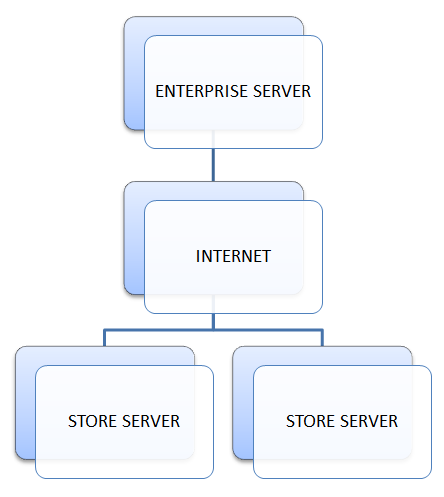
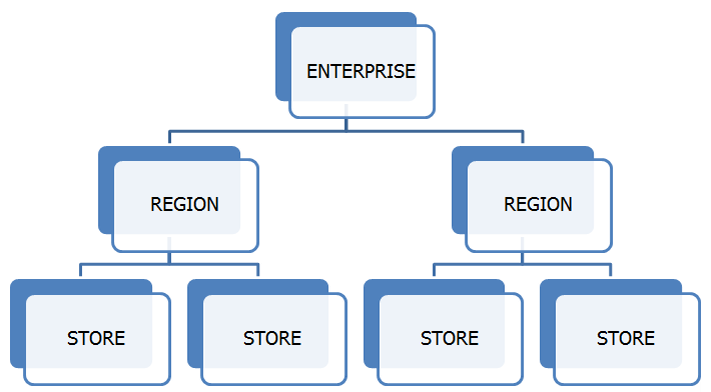
Enterprise is organized by region and store levels. Regions contain one or more Enterprise enabled stores and are used to determine how updates and other information are shared within the Enterprise environment. The diagram below illustrates the Enterprise environment structure.
Regions
A region consists of one or more stores that share information within the Enterprise environment. Regions can be used to delineate the stores that will be displayed when viewing reports or that will be updated when store settings are configured. Maintenance tasks can be completed for a region using the Enterprise Back Office. Users can view reports by region via the Enterprise Back Office.
A list of maintenances that can be performed at the regional level is shown below. View more information on each maintenance by clicking the appropriate link.
Stores
Enterprise stores are the lowest level of the Enterprise structure. A store is typically a physical location which has one or more terminals communicating with the Enterprise
Server. Maintenance tasks can be completed for the store using the Enterprise Back Office. Users can view reports by store via the Enterprise Back Office.
A list of maintenances that can be performed at the store level is shown below. View more information on each maintenance by clicking the appropriate link.
Gift Certificate Sharing
FPOS Enterprise allows gift certificates to be shared between stores within the Enterprise environment. Gift Certificates can be shared globally or regionally.This allows the user to sell a gift certificate at one store and redeem it at another. The Gift Card Reconciliation Report displays gift card sales by store and allows the user to view all gift cards redeemed, the location they were sold at, the location they were redeemed at, and any amount that was added to the gift card. The Summary section of the Enterprise Gift Card Reconciliation Report, lists any monies owed to other stores for gift cards sold or redeemed. For more information, see Enterprise Gift Card Reconciliation Report.
 Enterprise Communication