How to Create the EnableTransferRetry Registry Key
Adding the EnableTransferRetry registry key to the registry will allow Enterprise to attempt another transfer after the default 10 transfer attempts have failed. Creating the TransferRetryMinutes registry key will specify the number of minutes the Enterprise Server should wait prior to attempting another transfer.
- Open the Registry Editor.
- Navigate to the Future P.O.S. Registry:
- x86: HKEY_LOCAL_MACHINE\SOFTWARE\Future P.O.S.\EnterpriseClient
- x64: HKEY_LOCAL_MACHINE\SOFTWARE\Wow6432Node\Future P.O.S.\EnterpriseClient

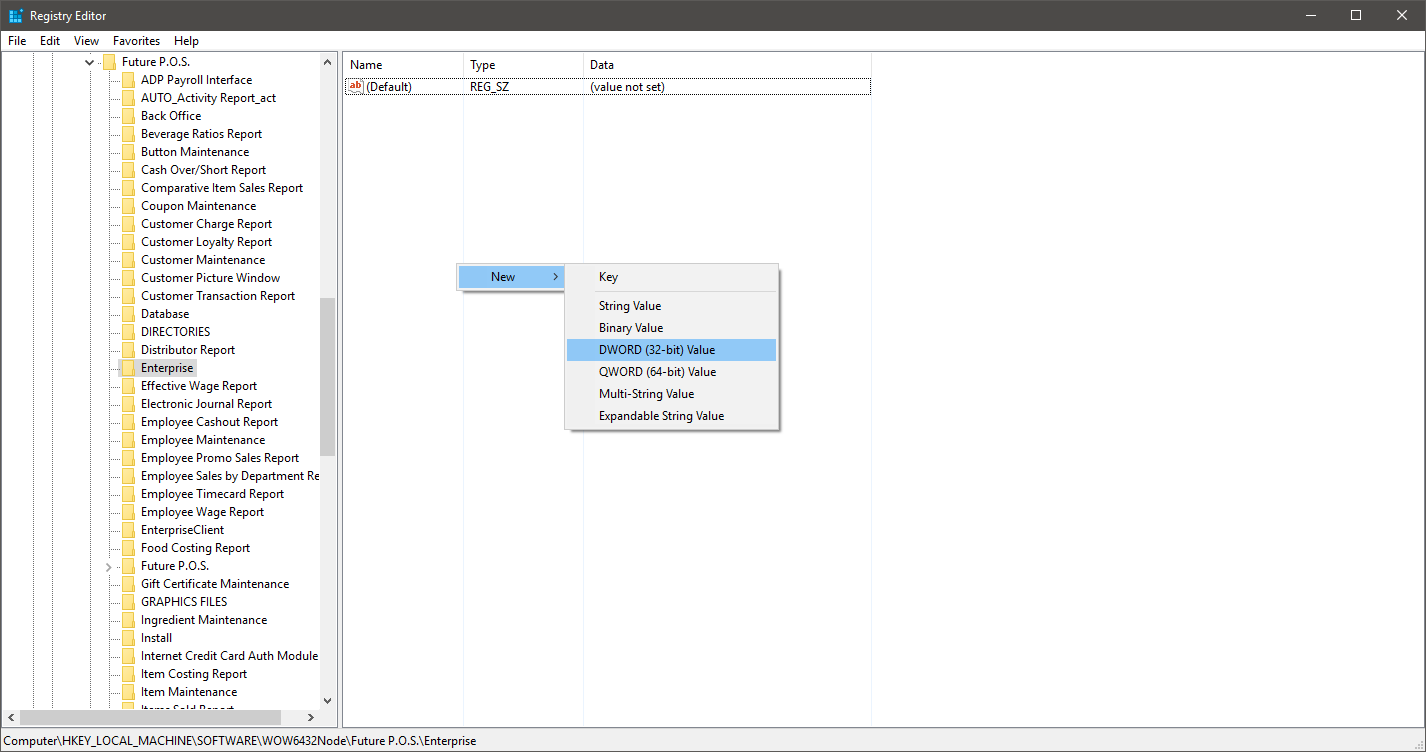
- Add the following values by right-clicking the EnterpriseClient registry key, clicking New > DWORD (32-bit Value):
- EnableTransferRetry - This registry key will enable the ability to reset the transfer record once it has reached the maximum 10 tries. Entering a Data value of 1 allows the user to set the retry value (in minutes). A Data value of 0 prevents the user from setting a retry value. This option is "Off" by default if the registry key is not present.
- TransferRetryMinutes - This registry key sets the transfer record retry length (in minutes). A Data Value entry of 10 is used by default; however, values between 5 and 180 (minutes) are valid.
- EnableTransferRetry - This registry key will enable the ability to reset the transfer record once it has reached the maximum 10 tries. Entering a Data value of 1 allows the user to set the retry value (in minutes). A Data value of 0 prevents the user from setting a retry value. This option is "Off" by default if the registry key is not present.
- Double-click a registry key to edit the Value data in the Edit DWORD Value dialog and then click the OK button.