Enterprise Employee List
Enterprise Employee Maintenance allows the user to generate a list of Enterprise Employees.
 How to Generate an Enterprise Employee List
- From the Enterprise Server, open the Back Office.
- Click the Maintenances icon.
- Click Enterprise Employee.
- Click File > Employee List.
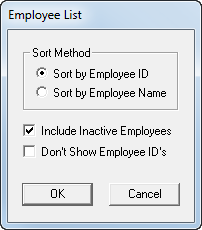
- Select a Sort Method.
- Sort by Employee ID will sort employees in ascending order by employee ID.
- Sort by Employee Name will sort employees in ascending order by employee Last Name.
- Select the Include Inactive Employees check box to include inactive employees in the list.
- Select the Don't Show Employee ID's check box to exclude employee IDs from the list.
- Click OK to generate the report.
Open topic with navigation